Lakehouse Pulse: Checking Your Databricks Jobs from Your Garmin Watch
Have you ever been out for a run, a jog, or a dive and suddenly wondered about the status of your Databricks jobs?
Well, have I got the app for you! Introducing Lakehouse Pulse1, this weekend’s vibe-coding side project: a lightweight Garmin Connect IQ widget that puts your Databricks Lakeflow Jobs (and optional FinOps spend) right on your wrist.
What It Does
Lakehouse Pulse is designed to give you an instant signal without burning your watch battery or waking idle Databricks compute:
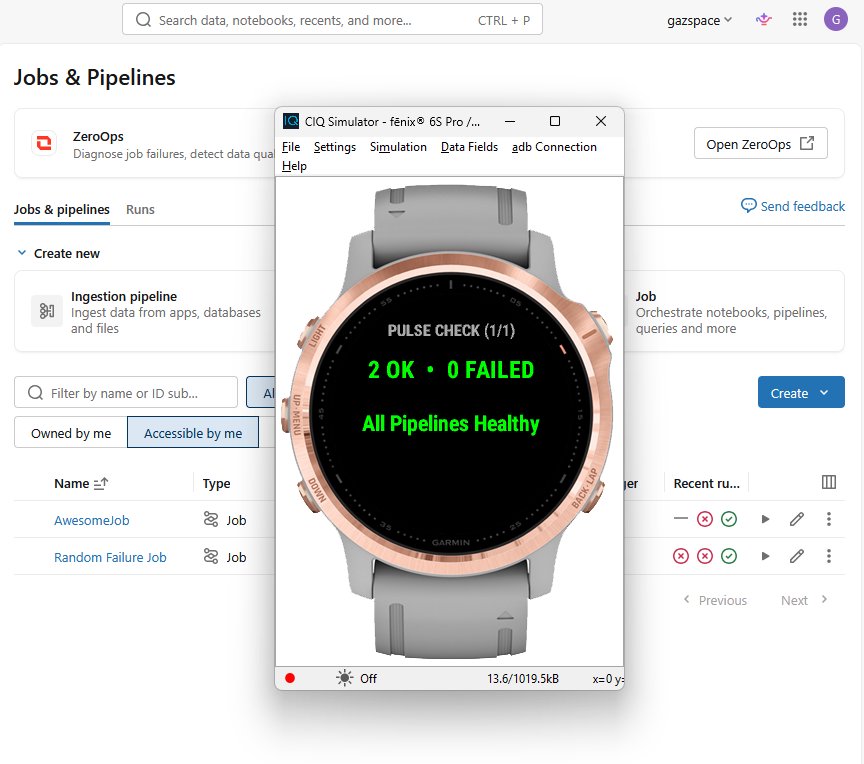
- Adaptive Garmin Glance View: Sits right in your watch’s widget carousel. When everything is green, it shows a clean
All Pipelines Healthysummary (plus daily spend when billing is enabled). The moment a job fails, it flips to red and surfaces the failing job’s name and how long ago it broke. - Pulse Check Page & On-Demand Refresh: Open the widget for the full OK vs. Failed breakdown and latest failure details. Hit
STARTat any time to force a live refresh. - Background Polling & Haptic Alerts: Checks in automatically on a configurable schedule (every 5–120 minutes, defaulting to 15) and vibrates your wrist if a new job failure appears since the last check.
- Optional FinOps DBU Burn & Pinned KPIs: On workspaces with access to
system.billing.usage, a second page tracks today’s estimated USD spend against your daily budget, your 7-day trend delta, and your top-consuming SKU, with a third page ready for up to three pinned SQL KPIs. On workspaces without billing access (such as Databricks Free Edition), those pages automatically hide themselves so you only see what applies. - Zero Idle DBU Cost: Job status is polled via the Databricks Control Plane Jobs API (
/api/2.1/jobs/runs/list), meaning 0 DBU and zero compute cold-start. When billing queries are enabled, they run through the Serverless SQL Statement Execution API with a 30-minute cache so your Serverless SQL Warehouse stays scaled to zero between polls. - Tiny, Honest Payload: Authenticates with Databricks OAuth M2M (Service Principal) on the backend and returns a tiny JSON payload. And if the live API call fails, the widget surfaces the error rather than faking an “all green”.
The Backend: Why Docker + Tailscale (For Now)
Because Garmin Connect IQ widgets run in a constrained Monkey C sandbox, and you definitely don’t want Service Principal credentials sitting on a wearable, the watch doesn’t talk to Databricks directly. Instead, it calls a lightweight backend proxy that handles OAuth M2M authentication, queries the Databricks APIs, and trims the response down to a tiny JSON payload the watch can parse effortlessly.
Originally, I wanted to host that proxy in an all-in-Databricks architecture. The catch is that standard Databricks Apps don’t scale to zero. Right now, only the new Databricks Genie App Builder apps do, and I haven’t had a chance to get my hands on those yet.
Since I’ve been playing with Docker lately, I built a containerised Node.js backend that I can run on one of my own servers while keeping all traffic strictly private inside my Tailnet mesh.
What About “Repair Run”? Enter Genie ZeroOps
My next planned feature was a button on the watch to trigger a Databricks repair run right from my wrist. Then Genie ZeroOps arrived to continuously diagnose failures and handle remediation for me.
That neatly shifts the watch’s role from a tiny on-call remote control into a passive observer. Instead of tapping through buttons mid-run to kick off a manual retry, I can glance at my wrist to see that a job broke and let ZeroOps handle the root-cause analysis and recovery in the background.
What’s Next
Going forward, I’m not sure yet whether I’ll publish Lakehouse Pulse to the Garmin Connect IQ Store or simply open-source the codebase for anyone who wants to self-host it. For now, I’ll polish the code a bit more and wait for Genie App Builder and Genie ZeroOps to mature a little further.
Genie all the things!
Naming note: I was originally going to call the app simply “Lake Watch”, which felt like a great pun for a smartwatch widget, until I realised it would cause confusion with Databricks’ new agentic SIEM solution, Databricks Lakewatch. Lakehouse Pulse it is! ↩︎